Temperature units
Possibility of choosing the temperature units was introduced in QuickField 6.3SP1. In the problems created using previous QuickField versions all temperatures are considered in Kelvins.
It does not mean that Kelvins were only temperature units used in previous QuickField versions. Many users specified temperatures block and boundary properties in Celsius degrees and interpreted the calculated results in Celsius degrees as well. However, this rule has exceptions - there should be no radiation boundary conditions in the problem. Radiation boundary condition Fn=β ksb (T4-T04) - this Stephan-Boltzmann formula uses temperature in Kelvins, thus the problem results will be different if the temperature is considered in Celsius degrees.
Starting from the version QuickField 6.3SP1 in the panel QuickField Options it is possible to choose the temperature units (Kelvins, Celsius or Fahrenheit degrees) which then will be used everywhere in QuickField for this user for all QuickField problems. These units will be used for display of numerical data or plots, but they do not affect the saved data and results, which are always stored in Kelvins.
If it is necessary to enter the numerical value or formula in units other than set in the Options panel - it can be done by addition the suffix ",K" for Kelvins, ",C" for Celsius degrees or ",F" for Fahrenheit degrees to the right of the value.
For example:
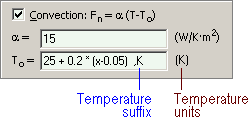
In this example the formula gives the temperature in Kelvins, and x variable is the horizontal axis coordinate. Symbols of the temperature units to the right of the entry field are automatically changed in case of the suffix use.
Comma separates the value and temperature unit. Unit letter may be lowercase or uppercase. Suffix with temperature units is shown in the string only if the value is defined by formula and temperature units in it are different from the default units.
When the temperature units are changed, or the QuickField problem is transferred to the computer with different temperature units, numerical values will be automatically recalculated into new units. Formulas will gain suffixes with the temperature units they were originally created with. This will assure correct results of the problem, but the field pictures, tables and maps will be displayed in the currently set temperature units.
Related Topics
QuickField options
Using formulas