Application-Wide Options
QuickField Options panel may be displayed using the command Tools/Options in the main menu, or by pressing the button  in the toolbar.
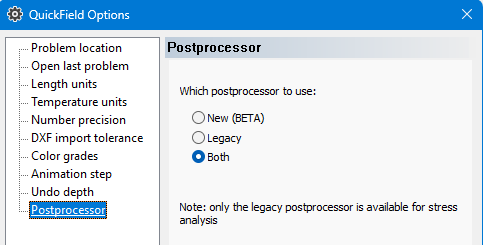
Left pane of the window shows the list of the options, and the pages for viewing/editing the chosen option are shown in the right pane. Pressing the OK button saves the options. Options are stored separately for each user of the computer.
- Option Problem location allows selection of the folder, where the search starts for loading or saving the problem files. If this field is empty, search starts from the current folder.
- QuickField may open the last used problem at start. This behavior may be cancelled using the switch Open last problem.
- Length units may be adjusted anytime individually for each problem. Default value is meter, but it may be changed using the Length Units option.
- Temperature units are used for display of temperatures in numerical values or plots, but do not affect the stored data and results which are always kept in Kelvins.
- The number precision option allows selection of the significant digits number ranging from 2 to 8 in the data entry fields or in the results display. Some parameters are displayed with the precision one less or one more than set in this option. Default precision is 5. This value is appropriate for most users.
- The option DXF import tolerance sets the allowed geometrical tolerance as a fraction from the model size, which may also be defined in the geometric model properties panel. If the distance between nodes is less than the set tolerance they will be merged during the import.
- Default number of the color levels for the QuickField color map display is 20. This parameter can be changed using the Color grades option.
- The option Phase step is related to the AC Magnetic and AC Electric problems. Default frame step for the animated field presentation is 5 degrees. This parameter may be adjusted here.
- Model editor and circuit editor save the history of user actions for possibility of reversing them. Maximal undo level is 100 commands. This value should satisfy most of QuickField users, but if necessary it may be changed using the option Undo depth. Larger value of the undo depth uses more memory.
- Postprocessor option allows you to choose which postprocessor to use.
- Select the symbol to use as a decimal separator when exporting data.
- An auxiliary edge is an unlabeled edge connecting blocks that share the same label. You can switch the display of auxiliary edges on and off.
- In local values mode a small cross indicates the probe point position. You can switch off the probe point display.