How to use the capacitance matrix calculation add-in?
Capacitance matrix calculation add-in may be connected to QuickField menu as usual add-in. It is installed by default and may be run by the command Capacitance Matrix from the Tool menu. If the electrostatic problem was open in QuickField at the moment then the capacitance calculator window would be displayed. Upper part of this window is shown here:
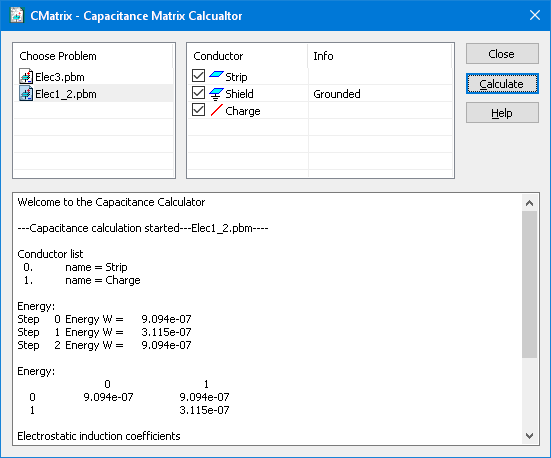
Select the task in the left list. All the labels of edges and nodes which QuickField regards to be conductors will be displayed in the list of conductors (at the right). Symbols located to the left from the label name correspond to edges and nodes of the QuickField model.
You could set or remove grounding from any of conductors by mouse click in the Info column. Partial capacitances are not calculated for grounded conductors with zero potential.
Conductor may be excluded from the calculations by the mouse click over the symbol to the left from the corresponding label. Excluded conductors are involved in the capacitance matrix calculation, but unlike grounded conductors, zero potential is not assigned to them.
When the conductor list is ready you may click the button Calculate and wait for results.
Results window for the 4-conductor problem will look like this:
List of conductors
0. 	label = Phase C
1. 	label = Phase B
2. 	label = Phase A
3. 	label = Phase
4. 	label = Bound


Energy:
Step 0 Energy W = 4.7781e-007
Step 1 Energy W = 4.7002e-007
Step 2 Energy W = 4.7764e-007
Step 3 Energy W = 4.7023e-007
Step 4 Energy W = 8.6528e-007
Step 5 Energy W = 8.7415e-007
Step 6 Energy W = 9.4136e-007
Step 7 Energy W = 9.4096e-007
Step 8 Energy W = 9.3789e-007
Step 9 Energy W = 8.6516e-007


Energy:
      	             0 	              1 	              2 	              3
    0 	    4.3385e-007 	    8.1934e-007 	     5.499e-007 	    4.4428e-007
    1 	                	    4.2489e-007 	    5.4576e-007 	    4.3508e-007
    2 	                	                	    1.2484e-007 	    1.3535e-007
    3 	                	                	                	    1.0552e-008

Electrostatic induction coefficients
      	             0 	              1 	              2 	              3
    0 	    8.6769e-011 	   -3.9394e-012 	   -8.7941e-013 	    -1.149e-014
    1 	   -3.9394e-012 	    8.4978e-011 	    -3.977e-013 	    -3.593e-014
    2 	   -8.7941e-013 	    -3.977e-013 	    2.4969e-011 	   -4.5687e-015
    3 	    -1.149e-014 	    -3.593e-014 	   -4.5687e-015 	    2.1105e-012

Self and mutual partial capacitances
      	             0 	              1 	              2 	              3
    0 	    8.1939e-011 	    3.9394e-012 	    8.7941e-013 	     1.149e-014
    1 	    3.9394e-012 	    8.0605e-011 	     3.977e-013 	     3.593e-014
    2 	    8.7941e-013 	     3.977e-013 	    2.3687e-011 	    4.5687e-015
    3 	     1.149e-014 	     3.593e-014 	    4.5687e-015 	    2.0585e-012
List of conductors shows the conductors with numbers assigned
After that the energy calculation results for particular problems are displayed, first in single column, and then in the upper-diagonal matrix form.
Next is the matrix of electrostatic induction coefficient shown, and then the matrix of Self and mutual partial capacitances. Use the list of conductors (above) to find the correspondence between the conductor number and its label.
Any text from the results window may be copied to the clipboard (Ctrl+C or the Copy command from the context menu).