3D postprocessor legend
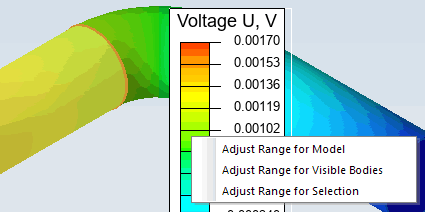
When the right mouse button is pressed over the 3D Postprocessor legend, the context menu is displayed. It allows automatic adjustment of the color range for the physical parameter used for the color map display.
- The command Adjust range for Model is always active. It resets the range settings calculated for all the active bodies of the model (set on default)
- The command Adjust range for visible bodies is always active. It calculates the range limits related to all visible bodies. Body is considered visible when one of its faces is visible. If all model bodies are visible then this command is equivalent to previous one.
- The command Adjust range for Selection is active when some bodies and/or faces are selected. The range is calculated per all selected objects.
Related Topic:
Creating 3D Model by Importing
Background Region
Control of the Density of 3D Mesh