Problem Properties Window
The Properties window can be opened using the Properties command in the View menu. This window is docked to the task windows (by default) or can be switched to floating.
The Properties window dynamically displays the current problem's properties.
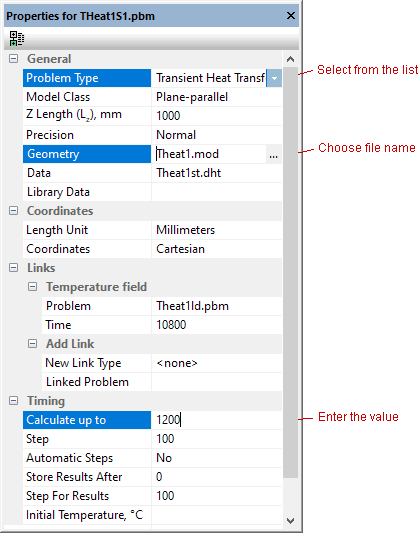
Here you can review and modify the common properties of the problem such as problem type, class, accuracy, and geometry or material data file names. Changing certain problem parameters will invalidate the existing solution. In this case you will be given a warning.
To link a problem in the "Coupled problems" section, select the imported physical property type and choose or enter the name of the source problem. The new link will be checked and if the problem meets the coupling criteria, the new link will be added to the list. To remove an existing link, simply clear the source problem file name from the corresponding property.
See also:
Structure of the Problem Database
Editing problem description properties