Time Dependencies Table
For transient problems QuickField provides the means to display time-dependent field quantities in a table where the rows correspond to different moments of time, and the columns, depending on the current mode, either to local field values at the given points or to the values integrated over the current contour of the field window.
To open the time table window, choose Time Table in the View or context menu of the field window.
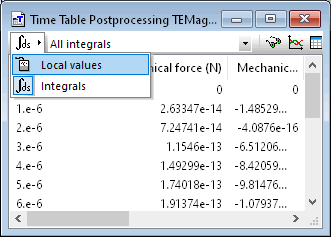
The drop-down listbox in the upper left corner of the table window allows one to toggle between local and integrated quantities. The default mode of the window depends on whether its contour is defined or not. If no contour exists the window displays local quantities (Local values mode). Otherwise it displays the quantities integrated over the current contour (Integrals mode).
In the Local values you can change the coordinates of the point. By default, both coordinates are 0. Having changed the coordinates click OK to apply the changes.
In a time table window you can:
- Copy the entire table or the selected rows to Windows Clipboard. To do that, select the desired rows and choose Copy (CTRL+C) in the Edit or context menu.
- Drag the selected rows to another application, like Microsoft Excel.
- When all rows in a table are selected, the table header is also included into copying and drag-n-drop operations. To select all rows in the table choose Select All (CTRL+A) in the Edit or context menu.
- Save the entire table in a text file. Choose File / Save As.