Solving the problem
To solve a problem, several conditions have to be met: the problem type, plane, required precision and other parameters have to be specified in the problem description. The model document must contain complete model with mesh and labels. Each label referred by the model is to be defined in the problem's property description documents.
You can save all the files related to the current problem at once using the Save All Problem Files command in the File menu.
To obtain the problem solution, click the Solve button  on the toolbar, or choose Solve Problem
in the Problem menu or context (right mouse button) menu of the Problem editor.
on the toolbar, or choose Solve Problem
in the Problem menu or context (right mouse button) menu of the Problem editor.
You may skip this action and directly proceed to the analysis results by clicking Analyze Results
on the toolbar  or in the Problem or context menu. If the problem has not been solved yet, or its results are out of date, the solver will be invoked automatically.
When you have number of problems opened simultaneously on your screen, the caption of a current one is highlighted.
You can also solve several problems one after another in unattended mode. Click Batch Solve in the Problem menu, and then select the problems you want to be solved in the list of all open problems. Unlike the previously described solving mode, when you can continue editing models, data and analyzing the results, in batch mode all the QuickField windows are suspended.
See also Scheduling QuickField for solving at specified time.
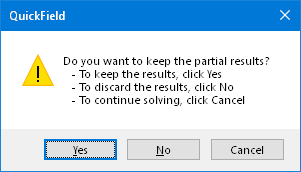
While the solver is running, a special bar indicator shows the progress of the solution process. To interrupt it, click Cancel on the indicator's panel. When solving a transient problem, you have an option to keep the results for already stored time steps.
Linear problems are solved by using a powerful preconditioned conjugate gradients method. The preconditioning based on the geometric decomposition technique guaranties a very high speed and close to linear dependence between number of nodes and the resulting solution time. Nonlinear problems are solved using the Newton-Raphson method. The Jacobian matrix arising at each step of the Newton-Raphson method is inverted the same way as it is done for linear problems.
Related Topics
Achieving Maximum Performance
Scheduling QuickField for solving at
specified time