Electrostatics Problem--Step-by-Step Description: Step 6
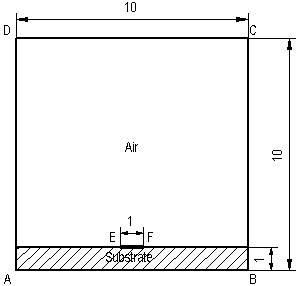
We can proceed with building a mesh of finite elements. To define the mesh density, we need to define mesh spacing parameters in several vertices of the model. We suppose that the electric field is most non-homogeneous near the ends of the strip, so the mesh there must be very fine. Therefore, we'll assign the spacing value of 0.2 cm to the vertices E and F and the value of 0.5 cm to the vertices A, B, C and D to build the mesh of approximately 1000 nodes. To define spacing values:
-
Select vertices A, B, C and D and click Properties on the context menu.
-
Click Manual spacing and type 0.5.
-
Click OK to close the dialog.
-
Repeat these actions to assign 0.2 cm spacing to vertices E and F.
-
On the Edit menu, click Build Mesh, and then In All Blocks to build the meshes for all blocks at once.
Now the model is ready. To save model in a file, click Save from the File menu.