Problem of Magnetics--Step-by-Step Description: Step 1
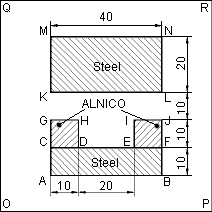
Your Examples folder contains Magn1 problem, nonlinear permanent magnet. Here we'll provide you with step-by-step instructions how to create and solve just the same problem from scratch. We'll forget the solution made in Magn1.pbm, and start a new problem, Magnet.pbm.
To create a new problem:
-
Click New Problem in the File menu. The dialog box appears, asking for the file name and location of the new problem.
-
In the Problem file name box, type Magnet.
-
In the Create in folder area, change the folder, if needed.
-
Click Next.