Problem of Magnetics--Step-by-Step Description: Step 6
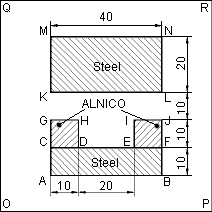
We can proceed with building a mesh of finite elements. To define the mesh density, we need to define mesh spacing parameters in several vertices of the model. We suppose that the field is most non-homogeneous around the magnets, so the mesh there must be maximum dense. Therefore, we'll assign the spacing value of 1 mm to the vertices G, H, I and J and the value of 5 mm to the vertices O, P, R and Q to build the mesh of approximately 2000 nodes. To define spacing values:
- Select vertices G, H, I and J and click Properties on the context menu.
- Click Manual spacing and type 1.
- Click OK to close the dialog.
- Repeat these actions to assign 5 mm spacing to vertices O, P, R and Q.
- On the Edit menu, click Build Mesh, and then In All Blocks to build the meshes for all blocks at once.
Now the model is ready. To save model in a file, click Save from the File menu.