Main >> Support >> QuickField Help
Settings pane
Help contents
Settings pane is positioned at the left, between the field calculator panes. It includes all control
settings grouped according to the presentation types.
Field view with 5 presentations: model geometry, colored surfaces, vector plot, scatter plot
and plane cut is shown at the Pic.
Selected presentations are shown by red circles in the settings pane at the left.
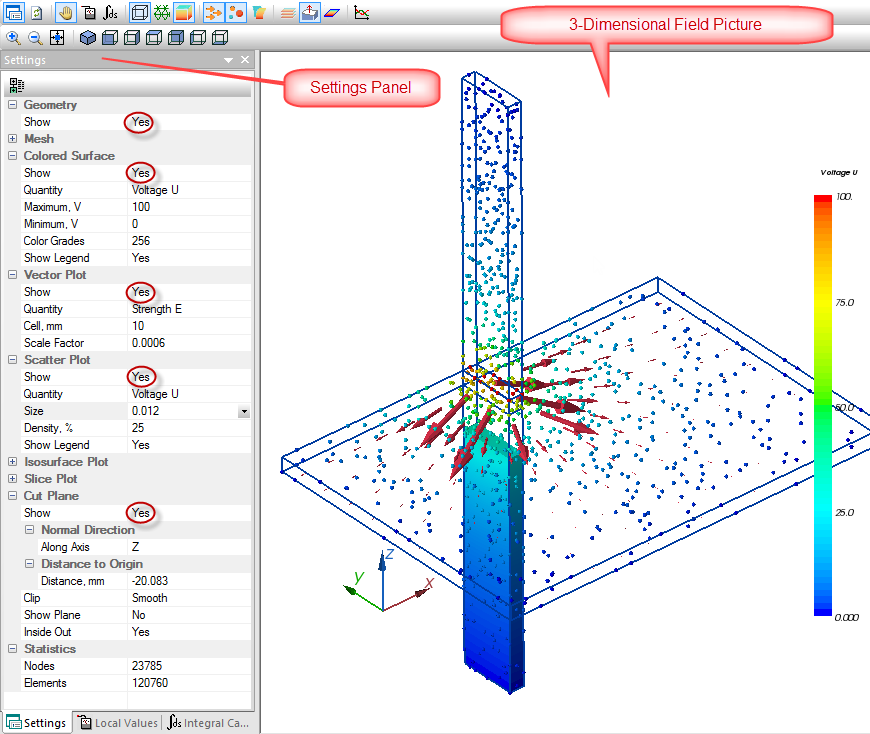
Pic. Field view and settings pane
Each presentation setting window includes one or more fields. The fields are positioned within a vertical
column, each field takes one line. Field name is shown at the left, value is displayed at the right.
Depending on the type, the value may be selected from the list, typed in or both.
The first control parameter of all presentations is the field Show which allows values Yes,
No and This only. The last value keeps only this presentation and removes all others from the screen.
Other parameters of each presentation are explained in the corresponding sections below.