Advanced Magnetics--Step-by-Step Description: Step 5
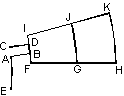
Now we create horizontal line segment:
-
Press INS (or Insert Mode from Edit menu, or Insert Vertices/Edges from context menu, or corresponding button on the toolbar) to switch Model Editor to Insert mode.
-
Click the left mouse button at first point (0, 0.375) and drag mouse to the second point (17, 0.375).
To create two arcs:
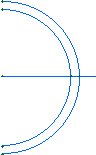
-
In New Edge Angle box on the toolbar, select Half arc (180°).
-
Drag from (0, -14) to (0, 14). New arc appears in the window.
-
Now drag from (0, -12.5) to (0, 12.5).
-
Press INS again to cancel Insert mode and return to Pick mode.
If you have created excess points or edges, you can remove them now:
-
Hold down the CTRL key and pick excess objects with mouse to select them. If you have selected the object you did not want to, pick it again to unselect it. Release CTRL.
-
Press DEL (or Delete Selection from Edit menu or context menu). Deleted objects immediately disappear.