Advanced Magnetics--Step-by-Step Description: Step 6
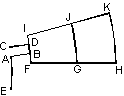
The intersection of the arcs with the line segment produced points A and B. Now we can delete extra line segments to the left of A and to the right of B:
-
Pick the vertex with coordinates (0, 0.375). The vertex will be highlighted.
-
Hold down the CTRL key and pick vertex with coordinates (17, 0.375). It will be added to selection.
-
Press DEL (or Delete Selection from Edit menu or context menu).
We have created the edge AB, now we can create CD using Copy command:
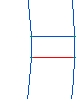
-
Pick a short line segment between arcs.
-
On the Edit menu or context menu, click Duplicate Selection, a dialog box appears.
-
Click Symmetry and then OK. By default the object is reflected with respect to the horizontal axis. At this point you can see a preview of the edge being created. To complete the creation process, click Yes button in the confirmation dialog box. Notice that the newly created edge remains selected, so there is no need to select it again in order to copy or move it.