Advanced Magnetics--Step-by-Step Description: Step 8
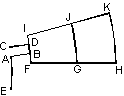
We have created edges FG and GH. To create edges IJ and JK we will first create a copy of the line segment FH using symmetry relative to x-axis, and then will rotate this copy by 15 degrees to obtain the line segment IK.
-
Pick edges FG and GH.
-
On the Edit menu or context menu, click Duplicate Selection, a dialog box appears.
-
Click Symmetry and then OK. By default the object is reflected relative to the x-axis. Confirm creation of new edges by clicking Yes button in the dialog box.
-
Click Duplicate Selection again. This time click Rotation, then type 15 for the Angle, then click OK. Confirm creation of new edges by clicking Yes button in the dialog box.
Lets now clean up our stator fragment by deleting all auxiliary elements. Finally we have to get a picture similar to the one shown. The most convenient way to delete an edge that contains an auxiliary vertex is to delete that vertex.
-
On the Edit menu or context menu, click Unselect All.
-
Hold down the CTRL key and pick vertices you want to delete. You can use rectangular selection (clicking and dragging diagonally) to select adjacent group of vertices.
-
Press DEL (or Delete Selection from Edit menu or context menu). Deleted objects immediately disappear.
This way you can delete all extra vertices and edges except the edge AC. To delete this last edge:
-
Click Zoom In on the toolbar. Select the region to zoom-in containing the edge AC.
-
Pick the edge AC.
-
Press DEL.
-
Click Zoom to Fit on the toolbar to see the whole model.