Problem of Magnetics--Step-by-Step Description: Step 5
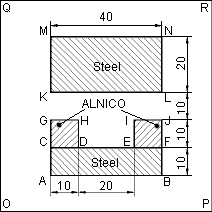
We are done with the model's geometry. Now we can assign labels to geometrical objects to describe material properties, sources and boundary conditions.
The problem contains four materials having different properties: the air, the steel and two pieces of permanent magnet, which differ in direction of magnetization vector. To be clear, we can use the labels Air, Steel, ALNICO Up and ALNICO Dn to label appropriate blocks. To assign these labels to blocks:
- Double-click within the CDHG rectangle. The block becomes selected and the Selection Properties dialog appears.
- In Label box, type ALNICO Dn.
- Click OK to close the dialog.
- Repeat the last actions to label the CDJI rectangle as ALNICO Up, and the environment as Air.
- Pick inside the ABFC rectangle, then press and hold CTRL key and pick inside the KLNM rectangle to select two blocks at once.
- Click right mouse button within selected area to bring up the context menu without changing the selection.
- On the context menu, click Properties and assign the Steel label to both blocks.
- Click OK to close the dialog.
Edge labels are used to define specific boundary conditions on inner and outer boundaries of the region. In our case, we need to specify zero Dirichlet boundary condition for the outer boundary. To assign labels to edges:
- Pick consecutively all edges, which constitute the outer boundary, holding the CTRL key. Those edges become highlighted that indicates the selection. If you have selected excess edge, vertex or block, pick it once more to unselect it.
- Click right mouse button within selection to bring up the context menu without changing the selection.
- On the context menu, click Properties and assign the Zero label to selected edges.
- Click OK to close the dialog.
Now we have finished with assigning labels to geometrical objects.