What's new in QuickField 7.0 SP1
Release date: April 28, 2026
In general
QuickField startup behavior has become more convenient, number display precision has been corrected, and several ActiveField (QuickField API) methods have been fixed.
Details
-
As you may know, version 7.0 introduced an option to automatically reopen all problems that were open in the previous session.
However, if one or more problems had been deleted or moved, QuickField asked unnecessary questions about their location. This behavior has been corrected.

-
The problem properties window, usually located in the lower part of the left panel,
can be accidentally closed. Although it can be easily restored using the
View > Properties command, its disappearance could confuse users.
Now, if the properties window is not visible when the first problem is opened, it automatically appears in its standard position — in the lower part of the left panel. When the second and subsequent problems are opened, their properties windows are stacked in the upper part of the left panel. - When several problems are opened at QuickField startup, the active problem is now exactly the one that was active in the previous session.
-
Number formatting in QuickField panels and tables now follows the number of significant
digits selected in the Number Precision setting.
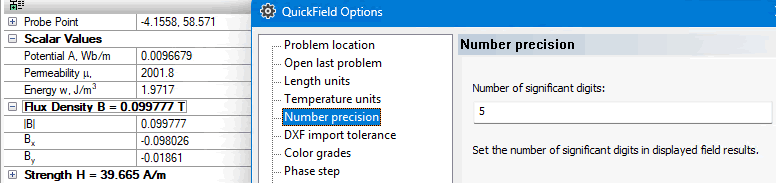
- When opening the second and subsequent field picture windows using the Windows > New Window command, the new window settings are copied from the previous one.
-
ActiveField programming interface fixes:
- The
Model.GetBitmapmethod now works correctly. -
The
Result.GetValuesArraymethod is now less restrictive and also accepts a static array of output quantities as an input parameter.
- The